
Strum - Play Guitar
Vert Media PartnersMusic & Audio
4.7228.00 Reviews
- Version
- 0.0.6
- Installs
- 100.00K
- Age Rating
- Teen
Screenshots
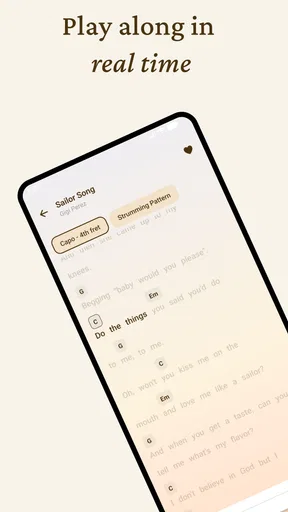
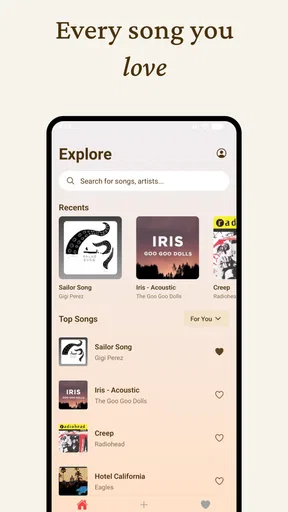
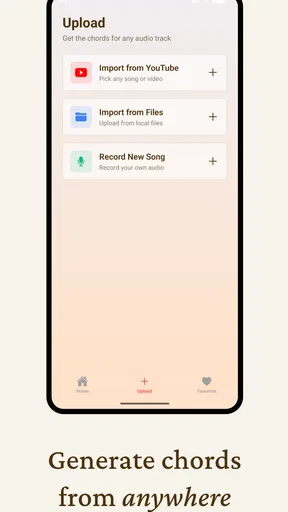
Our Review of Strum - Play Guitar
 Analysis by Appyee
I spent time with Strum - Play Guitar as a casual music app, and my first impression was pleasantly focused: it aims to put the basic pleasure of strumming within reach without asking me to carry a real instrument. That makes it interesting for quick practice, playful experimentation, or those moments when I want to interact with music rather than simply listen to it.
Its store summary is “Play your favorite songs,” while the short description reduces the idea to “Strum.” Those few words are simple, but they describe the appeal accurately. This is not presented as a full recording studio or a complete music-learning course. It is an accessible guitar-oriented experience from Vert Media Partners, available as a free Music & Audio app for Android users.
How Strum - Play Guitar fits into everyday listening
The app works best when I treat it as a small musical break. I can imagine opening it while waiting for a friend, relaxing after work, or showing a younger family member how a guitar interface feels before buying an instrument. The Teen content rating also gives a useful sense of its intended audience: it is not positioned solely as a children’s toy, but it remains approachable for older teenagers and adults.
What I like about this kind of app is the low commitment. A physical guitar needs space, tuning, maintenance, and a certain tolerance for noise while learning. A traditional guitar lesson usually requires a scheduled block of time. Strum sits between those choices. It lets me explore the basic action of playing whenever I have my phone available, even if I only have a few minutes.
That convenience does not make it a replacement for learning on a real guitar. A phone screen cannot reproduce the resistance of strings, the feel of a fretboard, or the small physical adjustments that make an acoustic or electric instrument sound clean. I would use this app to build interest and rhythm awareness, not to claim that I had mastered guitar technique.
What the free version means for a first try
The app is free to install, which lowers the barrier for anyone who is curious but undecided. That is especially helpful for a teenager considering guitar, a listener who wants a more interactive way to enjoy songs, or a casual user who does not want to commit to a subscription before understanding the experience.
There are in-app purchases priced at $6.99 per item. I would therefore spend a little time with the free experience before buying anything. The sensible approach is to decide whether the core interaction feels comfortable on your particular phone, whether the available song-focused experience matches your expectations, and whether you expect to use it often enough to justify an individual purchase.
One practical tip is to test it in the same situation where you expect to use it most. A guitar app that feels enjoyable while sitting quietly at home may be less convenient on a crowded bus, where screen glare, movement, and surrounding noise change the experience. Trying it in both a calm setting and a mobile setting gives a more honest impression than a brief launch at a desk.
Connectivity changes more than the first launch
Because this is a music app built around playing songs, connectivity can shape the experience even when the actual interaction feels simple. Initial setup, content access, updates, and purchase-related actions are the moments when I would want a reliable connection rather than assuming everything will behave identically everywhere.
I would avoid treating Strum as a guaranteed travel companion for a flight, a remote campsite, or a train journey with unreliable service unless I had already tested that exact situation. The responsible habit is to open the app before leaving, check that the material I intend to use is available, and avoid making an important plan around untested access. That is not a criticism of the musical concept; it is simply the difference between a connected app and a dedicated instrument.
For a normal home connection, the network question is less dramatic. I would still prefer to let setup and any content-related preparation finish on Wi-Fi before using mobile data. This is particularly useful when the app is being explored by a family member who may tap through screens quickly without noticing what is being loaded or purchased.
Why the phone context matters
Strumming on a touchscreen is naturally different from using a guitar. Finger placement, display size, hand position, and the phone’s response all affect the experience. On a larger device, I would expect the visual layout to feel easier to follow. On a compact phone, the same actions may feel tighter, especially for someone with larger hands or anyone trying to play while holding the device in an awkward position.
My preferred setup would be a stable surface, a comfortable viewing angle, and both hands free. That sounds obvious, but it changes the result considerably. Holding the phone in one hand while attempting to play with the other turns a musical activity into a coordination exercise. Resting it securely makes it easier to concentrate on timing and reduces the chance of accidental taps.
A useful everyday scenario would be a short evening reset. I might put the phone on a table, connect to home Wi-Fi, and spend ten minutes experimenting with a familiar song rather than scrolling through another social feed. The value is not only musical accuracy. It is the small change from passive consumption to active participation.
At the same time, I would not recommend using it while walking, cycling, or crossing roads. The app demands visual attention, and the temptation to keep trying “one more” interaction is enough to make it unsuitable for situations where awareness matters. A phone guitar is still a phone activity, so the usual screen-safety rules apply.
Handling interruptions, weak service, and recovery
The most important connectivity test is not whether everything works under perfect conditions. It is what happens after an interruption. A dropped connection, an incoming call, a locked screen, or an accidental exit can break the rhythm of a short session. I would make a habit of reopening the app calmly instead of repeatedly tapping the same control, especially if a song or purchase screen appears to be loading.
If an action does not respond, my first recovery step would be to check the connection and wait briefly. Next, I would close and reopen the app, then retry only once the interface looks ready. This is a better approach than repeatedly submitting an action, because repeated taps can create confusion about whether something happened in the background.
Purchase-related interruptions deserve extra care. Since individual in-app items cost $6.99, I would never continue tapping through a stalled transaction without checking the account or purchase history first. The safest routine is to confirm whether the item was already acquired before trying again. This is a small but important habit for anyone sharing a device with family.
Another practical recovery tip is to keep expectations modest after a forced restart. If I had been experimenting with a particular musical idea, I would mentally note the song or action before leaving the screen. That way, a brief interruption does not turn into frustration when I return. Apps are convenient, but they are not always as forgiving as a paper songbook and a guitar resting beside me.
Using it without wasting mobile data
I would manage Strum like any connected entertainment app: explore it freely on Wi-Fi, then use mobile data selectively. This is not about avoiding the app; it is about reserving cellular data for the moments when I actually want to play rather than allowing setup, updates, or repeated loading to happen unexpectedly.
My routine would be straightforward. I would launch it at home, complete any available preparation, and then test it briefly with mobile data disabled only if I specifically needed to understand how it behaves in that condition. I would not assume that a successful home session proves every part of the experience will work away from a network.
Families should also pay attention to the purchase flow. A free installation can still lead to paid choices, so I would use the device’s purchase protections and discuss the $6.99 items with younger users before handing over the phone. The Teen rating does not remove the need for ordinary account supervision.
For people with limited data plans, the trade-off is clear. Strum may be worthwhile as a home or Wi-Fi activity, but I would be cautious about making it a constant companion during commutes until I understood its network behavior. A downloaded music lesson or a physical instrument may be more predictable when connectivity is expensive or inconsistent.
Where it stands beside usual alternatives
The obvious alternative is a real guitar. That wins for physical technique, expressive control, and long-term skill development. It also creates a more authentic relationship with the instrument. Strum wins on convenience: there is no instrument to carry, tune, store, or keep quiet. For a curious beginner, that difference can determine whether practice happens at all.
Another alternative is a conventional music-learning app. Those tools are generally better when the goal is structured progression, formal exercises, feedback, or a clear curriculum. I would choose one of them if I wanted lessons that moved from chords to scales and then toward measurable technique. Strum seems more suitable for informal interaction with songs and the simple enjoyment of playing on a screen.
Streaming music is a different comparison. A streaming service is better when I want uninterrupted listening, discovery, playlists, and background audio. Strum is better when I want to do something with the music. It changes the role of the phone from speaker to instrument-like interface, even though it cannot provide the tactile depth of a physical guitar.
That distinction helps explain who should skip it. If you want professional recording, serious guitar training, advanced effects, or a dependable offline instrument replacement, this is probably not the right first choice. If you mainly want an easy way to experiment with familiar songs and see whether touchscreen strumming appeals to you, its focused approach makes more sense.
Small habits that make the experience better
I found that the best results come from treating each session as a short experiment rather than expecting a complete performance immediately. Start with a song or pattern that feels familiar, keep the phone steady, and pay attention to timing before worrying about speed. That approach makes the app more welcoming and also reveals quickly whether its interaction suits you.
I would also compare the app on the device I actually plan to use. A review on one phone does not guarantee identical comfort on another screen. Display size, touch sensitivity, speakers, and the way a device is held all matter. If the app feels cramped or awkward, the problem may be the physical setup rather than the musical idea itself.
A less obvious use is as a conversation starter. Someone who has never touched a guitar may be more willing to try a phone app than pick up a full-size instrument in front of other people. That makes it useful for discovering interest without the embarrassment of producing rough first sounds in a room full of listeners.
It can also work as a creative pause between listening sessions. Instead of jumping from one song to another, I can spend a few minutes interacting with the musical idea that caught my attention. I would not confuse that with composition software, but it is a more active habit than simply letting an album play in the background.
Performance expectations and the current build
The current version is 0.0.6, so I approach it with the expectations I would have for an early-stage release. A version number like this suggests that the experience may continue to change, and I would keep the app updated when convenient rather than assuming every screen will remain exactly the same.
It supports Android 7.0 and later, which makes it accessible to people using older compatible devices. That broad reach is useful, but older hardware can still influence touch response, loading, and general comfort. If the app feels delayed, I would first test it after closing other demanding apps and checking that the phone is not struggling with storage or background activity.
Its audience response is encouraging: it has a 4.7 average from around thirty-nine thousand ratings, with over one hundred thousand installs and 228 written reviews. I see that as evidence of meaningful interest, not a guarantee that every phone, playing style, or connectivity situation will feel identical. Ratings tell me that the concept is landing for many people; my own decision would still depend on whether the touchscreen interaction feels natural.
My connectivity verdict
Strum - Play Guitar is most convincing as a lightweight, connected way to make music more interactive. I like the idea of opening it for a few minutes at home, using it as a low-pressure introduction to guitar-style playing, or sharing it with someone who is curious but not ready for a real instrument. The free entry point makes that experiment easy, while the Teen rating keeps its audience clearly above the very-young-child category.
My main caution is practical rather than musical. I would not rely on it in places with uncertain service until I had tested the exact content and workflow I wanted. I would prepare on Wi-Fi, protect against accidental purchases, and keep a stable surface available for better touchscreen control. Those habits reduce the friction that can otherwise make a quick session feel less spontaneous.
For serious guitar development, a real instrument or a structured lesson app remains the stronger choice. For passive listening, a music-streaming service is more appropriate. But for the middle ground—wanting to play with songs without carrying a guitar—this app has a clear purpose. My recommendation is to try the free experience on your own phone, preferably over Wi-Fi, and judge it by how naturally its strumming fits your everyday routine.
Verdict
Strengths of Strum - Play Guitar
- Simple chord-based lessons are suitable for beginners.
- Interactive strumming exercises help build timing and rhythm.
- Songs are organized for quick practice sessions.
- Clean interface makes navigation easy on mobile screens.
- Useful for practicing quietly without carrying a physical guitar.
Limitations of Strum - Play Guitar
- The song selection may feel limited without a subscription.
- Some lessons require in-app purchases to unlock fully.
- It cannot replace guidance on posture and proper guitar technique.
- Advanced players may find the exercises too basic.
- Practice quality depends on your phone’s audio and microphone setup.
Other Releases by Vert Media Partners
View All
Plug AI: Texting Assistant
Lifestyle2.4

Astra - Life Advice
Lifestyle4.4
Similar Picks in This Category
View All
YouTube Music
Google LLC4.4

Samsung Music
Samsung Electronics Co., Ltd.3.8

Spotify: Music and Podcasts
Spotify AB4.3

JioSaavn - Music & Podcasts
Saavn Media Limited4.3

Lark Player:Music Player & MP3
Lark Player Studio - Music, MP3 & Video Player4.6

StarMaker: Sing Karaoke Songs
SKYWORK AI PTE. LTD.4.3
Frequently Asked Questions
What is Strum - Play Guitar, and how does it work?
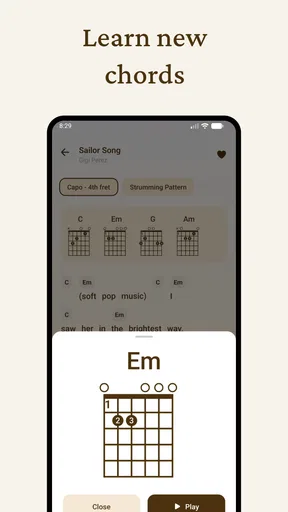
Strum - Play Guitar is a mobile guitar-learning and playing app designed to let you practice chords, strumming patterns, and songs directly on your Android or iOS device. It typically uses interactive chord diagrams, guided lessons, or virtual guitar controls so you can follow along without owning a physical instrument. The app is suitable for beginners, casual practice, and users who want a convenient way to explore guitar basics.
Can beginners use Strum - Play Guitar effectively?
Yes, Strum - Play Guitar is intended to be accessible to beginners, especially users who are still learning chord names, finger placement, and basic rhythm. The visual interface can make it easier to understand how chords are formed and how strumming patterns work. However, a phone cannot fully replace the feel and resistance of real guitar strings, so the app works best as a learning aid alongside regular practice on an acoustic or electric guitar.
Does Strum - Play Guitar require a real guitar or additional equipment?
You can generally use Strum - Play Guitar without connecting a physical guitar or buying extra equipment, since the app provides a virtual playing and learning environment on your screen. Headphones may be useful if you want clearer sound or plan to practice in a shared space. If the app includes tuning, recording, or microphone-based features, granting microphone access and using a quiet environment may improve accuracy and overall experience.
Is Strum - Play Guitar free to download and use?
The app may be available to download for free, but some lessons, song content, sound options, or advanced tools can require in-app purchases or a subscription. Before downloading, check the current listing in the Google Play Store or Apple App Store for pricing, trial conditions, advertisements, and supported devices. Availability of specific features can also vary by platform, region, and the version installed on your phone.
What should I check before downloading Strum - Play Guitar?
Before installing Strum - Play Guitar, review the app's compatibility requirements, requested permissions, privacy information, and recent user feedback. Confirm that your device has enough storage and that your operating system is supported. It is also worth checking whether the app works offline, contains advertisements, requires an account, or offers the songs and learning tools you want. These details can affect both convenience and the overall value of the app.
